Travel has completely changed in today's society, thanks to technology. Do you know what a web check-in is? You can use this wonderful procedure to check in for your flight online, greatly easing your travel experience. I promise it's not as difficult to conduct web check-in as it seems, so let's get into the specifics step by step.

Step 1: Choose Your Airline
First things first, open up your web browser and find the official website of the airline you're flying with. Let's say you're flying with “Air India” just type in "Air India official website" in your search engine and you're on your way.
Step 2: Locate the Web Check-In Option
Once you're on the airline's website, keep an eye out for the "Web Check-In" or "Check-In" tab. They usually put it front and center so you won't miss it. Some airlines even have nifty mobile apps that make the process even easier.
Here are some links of some airlines:
Air India: Air India Web Check In
Indigo: Indigo Web Check In
SpiceJet: Spice Jet Web Check In
AirAsia: AirAsia Web Check In
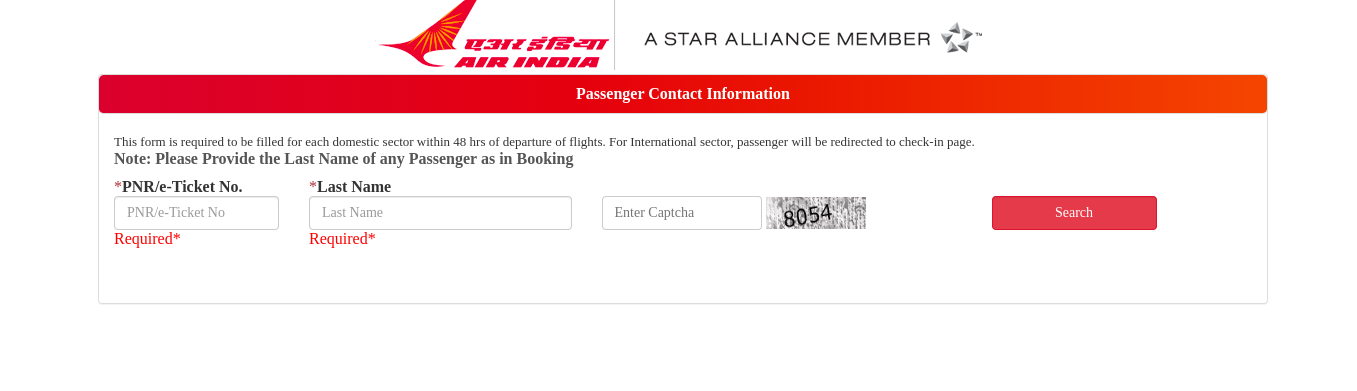
Step 3: Fill in Your Details
Click on that "Web Check-In" option and they'll ask you for some info. Nothing too complicated, just your last name, booking reference or confirmation code, and the city you're departing from. Accuracy matters here, so double-check everything.
Step 4: Pick Your Flight
You'll see a list of your upcoming flights after you've given them the right info. Just choose the flight you're checking in for. If you're doing a round-trip, focus on your outbound flight for now.
Step 5: Choose Your Seat
This is where it gets fun. They might show you a seat map, and you can pick where you want to sit. Here's the scoop:
- Some airlines let you choose your seat for free.
- Others might charge you for the good seats.
- And a few airlines will just assign you a seat, but you can change it during check-in.
Imagine you're flying with SkyFly Airlines, and they're cool with you choosing your seat for free. You spot a window seat, 15A, and that's where you want to be.
Step 6: Double-Check and Hit Confirm
Before you hit that confirm button, make sure all your info is correct. Your name, flight stuff, and the seat you picked. This is your chance to fix any mix-ups.

Step 7: Say Hello to Your Boarding Pass
Once you confirm, your boarding pass pops up. This thing is your golden ticket. It has everything you need:
- When and where you're flying.
- Your seat (15A, remember?).
- The gate where your adventure begins.
- What time you should be ready to board.
Step 8: Save or Print Your Boarding Pass
Almost all airlines offer choices. Your boarding pass is available for download to your phone, email delivery, or the more traditional method of printing. But in all seriousness, having it on your phone is very useful.
Step 9: Baggage Check
Web check-in is cool, but don't forget about your bags. Make sure you know the rules for your airline. If you're checking a bag, find out where and when to drop it off.
Step 10: Get to the Airport Early
Web check-in is awesome, but you still need to be at the airport in good time. Plan for about 2-3 hours before your flight. That should give you enough cushion for security and any unexpected hiccups.
More Stuff to Know
Frequent Flyer Perks:
If you're part of a frequent flyer program, logging in could score you some sweet benefits like skipping lines or extra luggage space.
Special Circumstances:
If you're traveling with pets or kids, web check-in might not be available for you. It's always good to double-check with the airline.
Mobile Magic:
A lot of airlines have apps that let you check in, keep your boarding pass handy, and stay updated on your flight, all from your phone.
Last-Minute Tweaks:
Life's unpredictable, and your plans might change. With web check-in, you can switch seats or make changes to your travel details on the fly.
Digital Wallets:
Some airlines let you save your boarding pass to your phone's digital wallet, like Apple Wallet or Google Pay. No more fumbling for paper!
Real-Life Stories and Perks:
Jet-Setting Across Continents:
Sarah's off to Tokyo from London with "AirGlobe Airlines." Thanks to web check-in, she breezes past lines at the airport, heading straight to security.
Family Fun Times:
The Martinez family's bound for Orlando with "SunJet Airways." Web check-in means they're seated together, ensuring a joyous family escapade.
Business Bonanza:
Frequent flyer John's always jetting off for work with "GlobalFly Airlines." Web check-in keeps things efficient, giving him more time for his professional pursuits.
Last-Minute Surprises:
Emily's got an unexpected early meeting and needs to catch a sooner flight. Thanks to "SpeedAir," she switches her seat on the fly without a hitch.
Group Getaway:
Friends on an adventure with "Adventure Wings" ensure they're seated close by using web check-in, making the flight even more enjoyable.
Your Ticket to Effortless Travel
In the modern world, web check-in acts as your travel experience's magic wand, by following these suggestions and utilising the benefits of technology, your journey can be trouble-free. Whether you're flying off for work or pleasure, alone or with loved ones, web check-in creates the perfect atmosphere for an amazing travel experience. Accept the digital age and let your travel fantasies come true!